Big Maps
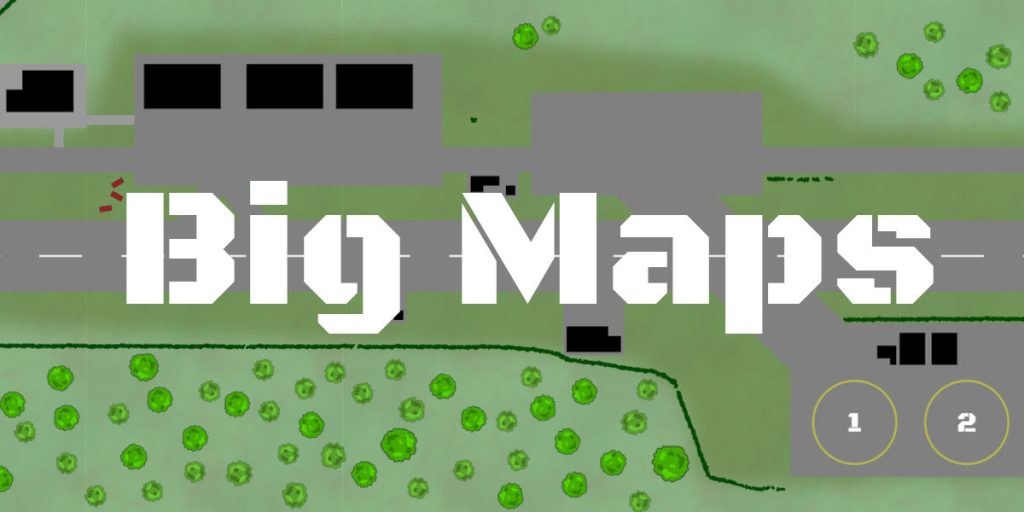
A while back I did some thinking about starports. Recently, I’ve wanted to put together some nice Traveller maps for use when demoing things as part of my Foundry video series, and decided that a small star port would be a good idea. It would also help me in my quest to understand what a small star port actually looks like. If I don’t have a picture drawn out, then I find it very hard to describe it to players.
For a map in Foundry, I wanted a ‘battle map’ rather than an overview schematic. So something at a grid scale of 1.5m, which characters can ‘walk around’ in, explore, and possibly have gunfights in.
It’s quite common for battle maps to be 20×20 or maybe 40×40 in size at most (so 30m wide, or 60m wide respectively). However, given that a Far Trader is over 30m long, you’re already pushing the larger sizes of maps just for the landing pad.
Then you want a warehouse or two, maybe a traveller’s lounge with very basic facilities as well. Is the starport in the middle of nowhere, or does it have a small settlement attached? Even for a class E starport, you’re looking at a big map.
But, a lot of my ideas had the starport attached to an airport. Which means you need a runway, and even at the bottom end of the scale for light aircraft, you’re looking at several hundred metres in length. So the question became, is it possible to create a map for a small airfield in FoundryVTT, using a 1.5m grid scale?
I’d normally use Dungeondraft, but this really struggles with large maps. So I started with Inkscape, drawing out a single runway and a few small buildings using SVG format. SVG is really good for doing sparse maps, where the map is a large area, but not much detail.
Going for a 256px resolution would be insane, so I cut it down to 100px. Using a pure East/West runway meant I could keep the map thin with a 460m long runway. That meant a map 32,000 pixels wide, and 16,000 pixels high when exported as a bitmap (note, this is smaller than the ‘insane’ option I’d discounted).
For display in Foundry, I cut this into two PNGs (a left, and a right), and imported them as tiles. Performance was slow, but it sort of worked. I did try using WEBP, which is a more compact format, but this seemed to have problems with image sizes. PNG seems better capable of handling larger images.
After a bit more research though, I decided a 700m long runway would be more appropriate, so increased the width of the map to 48,000 pixels – at 100px/square, that’s 720m in game scale.
So I now had something like this:
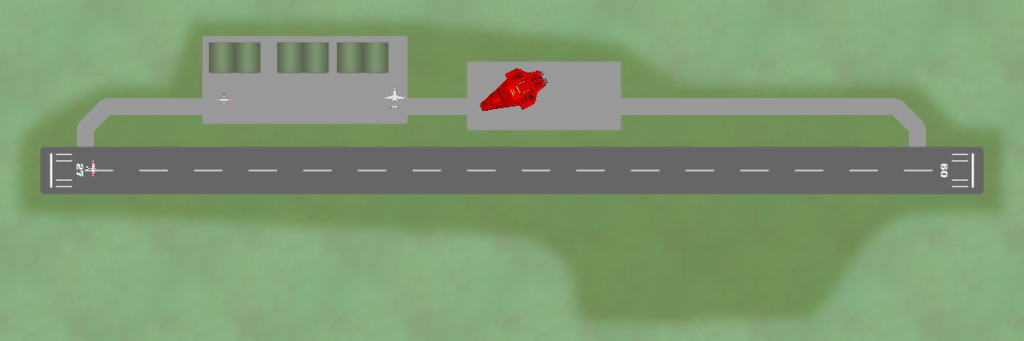
However, Foundry was struggling a lot by this point, so I cut the map into six sections. With a bit of Bash magic, I managed to automate this so I didn’t have to manually crop the image for each export.
inkscape --export-area=0:0:16000:8000 --export-filename=e_05-00.png E_05.svg
inkscape --export-area=16000:0:32000:8000 --export-filename=e_05-01.png E_05.svg
inkscape --export-area=32000:0:48000:8000 --export-filename=e_05-02.png E_05.svg

inkscape --export-area=0:8000:16000:16000 --export-filename=e_05-10.png E_05.svg
inkscape --export-area=16000:8000:32000:16000 --export-filename=e_05-11.png E_05.svg
inkscape --export-area=32000:8000:48000:16000 --export-filename=e_05-12.png E_05.svg

for f in e*png
do
    convert $f $(echo $f | sed "s/png/webp/g")
    rm $f
done
Adding the six tiles into a Foundry scene 48,000px by 16,000px in size wasn’t too hard, but now I was seeing other issues. Foundry crashed. Then my graphics card started spewing random crap over the screen, before finally also crashing with out of memory errors.
So I changed the scene resolution to be 50px per grid, and reduced the scene size to be 24,000 by 8,000. I still used the same map images, but reducing their tile size in Foundry to match (so each tile was a 16,000 by 8,000 pixel image, but displayed at only 8,000 by 4,000 pixels in size). This gives a smaller scene, but the quality still looks okay when zoomed in.
For the buildings though, I wanted to keep a decent resolution, and drawing it all in Inkscape would be fiddly. So I decided to switch to Dungeondraft. Drawing the buildings at 256px/grid resolution meant that the bits of the map that were important could still be in high resolution, whilst the bulk of the map was low resolution.

The above warehouse is one of the green buildings near the top left of the airport map. This was exported from Dungeondraft at 256px resolution (some 8,192px wide for the entire building map, at 40×40 size). Since the Foundry scene is using a 50px grid, the warehouse was added as a 2000px wide tile, and overlayed on the map in the right place. When players zoom in, the full 256px resolution is still used.
For the roof, I drew that in Inkscape and added it as a roof layer, setting the Occlusion Mode to be “Vision (Token Field of Vision)”. This means that when you are outside the buildings, you see a top down view of the airfield, and the roof of a building. When you are at a door, or inside the building, you see the interior of the building.

By this point I had a more complete map, and had added the starport part as well in the bottom right. Two landing pads, and a couple of warehouses. By now, all the buildings I was simply drawing in Inkscape as black blocks to mark their positions. The actual buildings themselves I’m doing in Dungeondraft.
Currently, I’m using some of Tyger’s Modern asset sets, but will be moving away from those to just use my own. Tyger’s are nice, but the ‘Free’ license has all sorts of restrictions on usage, and requires monthly payment for any vaguely commercial use. I’m not using this for commercial reasons at the moment, but don’t want to be tied in to monthly fees at a later date. I don’t mind paying one-off fees, but I’m not keen on monthly license costs.

So we now have a decent sized airfield, big enough for light aircraft. And we have an attached E class starport, big enough for a couple of Far Traders. The XT-Line will be around the starport, with a very small customs building (which may be mostly unmanned, depending on the world).
Foundry performance seems to be good. However, I may reduce the resolution of the airfield map to from 100px squares to 50px, to match what is in Foundry. This will reduce the image size further. I have a Nvidia 3090 graphics card with 24GB of memory, so I’m testing on something at the reasonably high end of things.
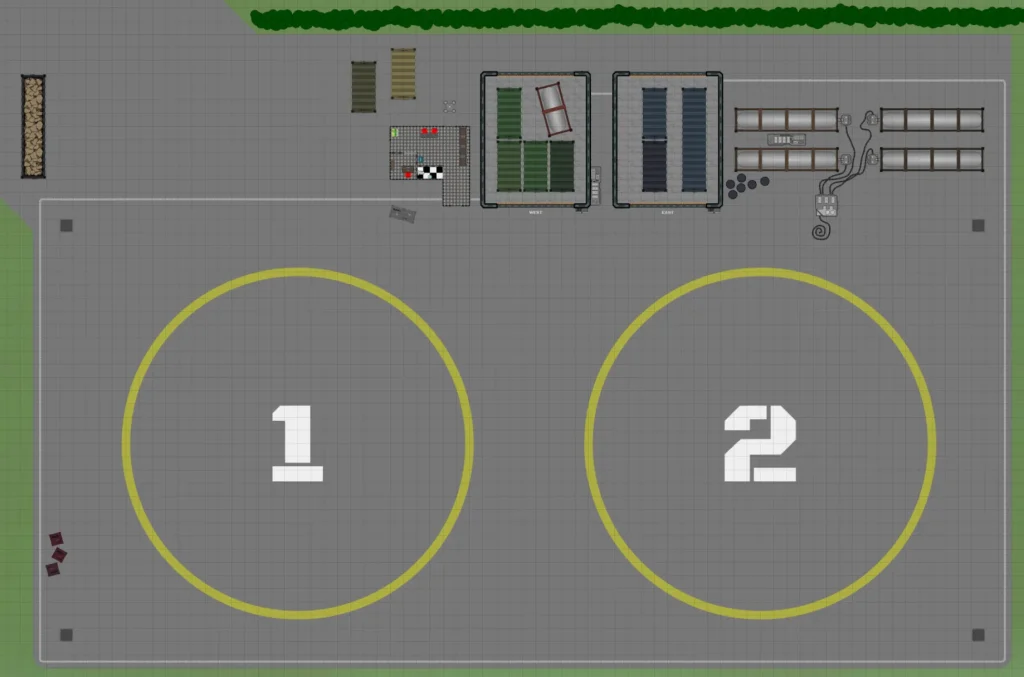
To get a sense of the scale of this, the landing pad map shown above is quite big for a battlemap. You can see the square grid, where the grid size is 1.5m. This map is only a small portion of the whole map though.
The real question though, is whether such a map is useful. Would it be better served with maybe a handout showing the overview, and one or two scenes each concentrating on different parts of the map?
Part of the reason for doing this was to see what could be done. So, in future, if I really do need to do this, then I know what the limitations of Foundry are, and how to work around them.
But, also, it does allow for some proper SciFi/Modern style of combat. Traveller is not D&D, where everything is either melee or short range archaic weapons and magic. Travellers have weapons with ranges of hundreds to thousands of metres. It wouldn’t be uncommon to have shooting at these ranges.
You could just have a large scale, maybe 15m instead of 1.5m, which would work. But then if you have combat at both scales simultaneously, you may want everything on a single map. If you want to charge across the airfield, and then raid into a hanger, you need to switch scales at some point.
Though it’s probably against health and safety, I’ve put some small buildings and obstacles nearer the middle of the airfield, to provide cover and break line of sight. If Travellers need to run across the airfield whilst under fire, they have a chance of doing so. Part of the advantage of using a large map at a small scale is that it does give a good impression of the size of the area.
I also got a copy of the new Twilight 2000 for Christmas, which comes with a set of really nice maps. I’d like to do something similar for Traveller, not just for publishing, but also for personal use. Some of these could end up being quite large, or be designed that they tile together so they could be large. A few airfield/starport maps like this, or maybe some small areas of modern or high tech towns.
So I’m going to continue fiddling with this, and see where it gets me. I might decide that this is all just a silly idea, but at the very least, it will give me a reference point I can use later.