Foundry Updates
Due to illness, work, holidays and various other things, we’ve had reduced gaming over the last few weeks. I’ve still been working on my Foundry system for Mongoose Traveller 2e though, and since I don’t have much of a voice due to a sore throat this weekend, I thought I’d do a blog post rather than one of my usual development diary videos.
Firstly, I’ve had increased community support for translations. MgT2e now supports three languages other than English:
- Spanish
- French
- Brazilian
I’m grateful to those helping out on this. Every time I add in a new language, I notice where I lack i18n support on the sheets though. I really need to improve on making sure every piece of text has full i18n support so that it can be easily translated. It’s so easy to be lazy when quickly writing new code, with an intent to back fill with internationalisation strings later.
So I’m trying to be better, to ensure I use internationalisation from the start.
Sheets
The main thing I’m working on at the moment though is support for Vehicles and Robots. Vehicles have had some big updates under the Mongoose rules in 2026, so I’m converting the vehicle sheets to support the new rules.
As part of this, I’m working on moving to the v2 API. The v1 API will be dropped in version 16 of Foundry, so probably in a couple of years time. Hopefully that gives me time to convert all the sheets across to v2. It’s also giving me a chance to implement things properly, since when I started I really didn’t know what I was doing.
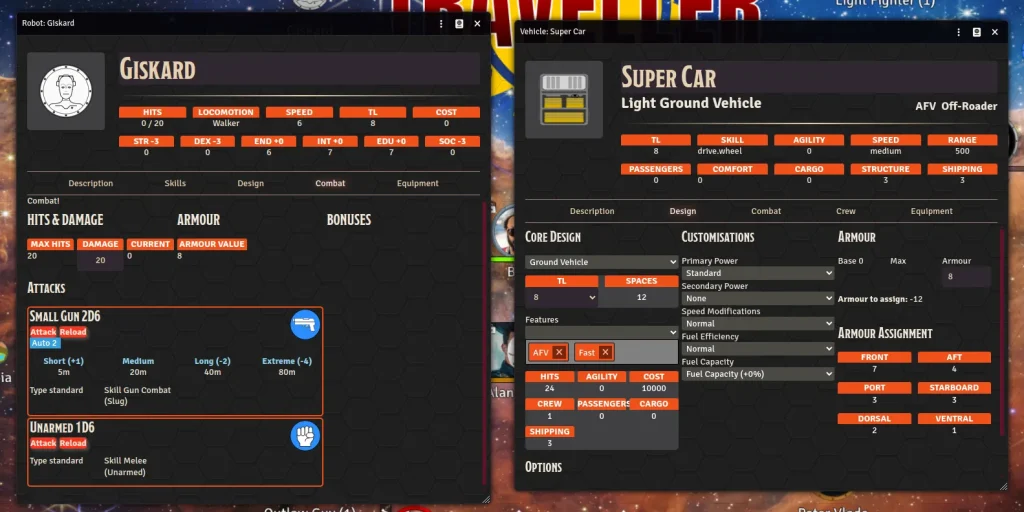
The UI for v2 is very much a dark theme, so I need to decide whether to change to that, or to revert back to the lighter version of the character sheets. For the item sheets, I’m using a darker blue background, so I might try something similar for the actor sheets.
I’m also moving away from having a sidebar, which gives more width for the rest of the sheet. However. that raises the question of how to display the actor portrait. On the old sheets, the portrait will vertically expand, so if you have a ‘tall’ version of an actor image, it will expand to show the full image. Without the sidebar, the tabs go right across the page, preventing any image from expanding to show the full vertical height. This may give a ‘thin’ image if it is much taller than it is wide.
Personally, I prefer square images for portraits, but not everyone bothers to crop their images to a convenient aspect ratio.
For the item sheets, I’m now using tabs, to split the information in a much cleaner way. With dynamic tabs, I can keep ‘standard’ and game critical information visible at the top in a consistent fashion, then show tabs specific to the type of item. For example, build data can be hidden in a tab, and just the end results shown at the top.
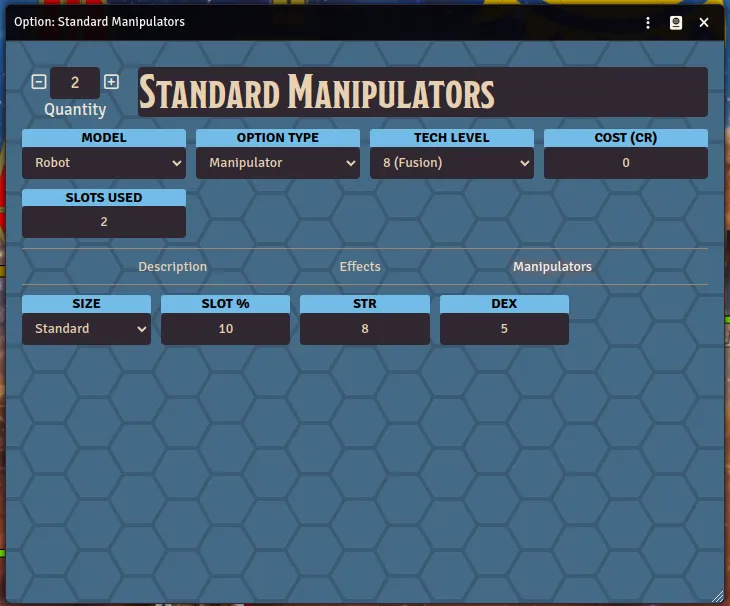
I’ve just realised that I’m not displaying the image icon for the item yet. I can possibly put that on the description tab, and have that as the default. Then it provides room at the top for all the important information.
Extra information, such as attached components, computers and active effects will all have tabs of their own, rather than getting in the way of the basic information.
Vehicle Tokens
As part of the Vehicles work, I’m creating icons for all the vehicles in the new Vehicle Handbook. I also need to do the vehicles in the Vehicle Catalogue as well. My plan is to have scale tokens for each vehicle, though there are difficulties.
I’ve done something similar for Highguard (though I don’t use a linear scale for those, given the huge different in size between 100t scouts and 500,000t dreadnaughts), but that has deckplans so it’s easy to see how big each spacecraft actually is.
For vehicles, it’s a bit trickier. Though they have a Spaces value, and a Shipping Tonnage, that doesn’t give a true indication of size, since neither defines width, length and height. For some vehicles these are relatively easy to figure out, for others it’s a bit harder. It’s possible that I’m completely misunderstanding what is described on page 25 of the new Vehicle book, in how spaces and tonnage relate to each other and what they mean, so what follows may be wrong.
Take the Brutus Heavy Cargo Truck for instance. It isn’t clear what the purpose of this is. At 80 spaces, it has a shipping volume of 40t. It’s a ground vehicle, so it’s probably no more than 3m in height. That’s one starship deck. Each ton is two 1.5m x 1.5m squares, so that’s 80 squares on a deck plan.
If we assume 4 squares wide, that’s 20 squares long. Which is 30m. Something like a HEMTT is only 10m long. The longest vehicle allowed on UK roads is about 18m. I had difficulty understanding the US rules, but they seem similar for single trailers.
But all roads limit vehicles to no wider than 3m, and 4 squares of width is 6m. So the Brutus is way too big for an on-road transport. It is designated as an off-road vehicle – so does that mean it’s only meant for off-road environments? Or is it meant for road use, but the designer didn’t think about how big 80 spaces actually made the vehicle? Or is it meant to be really really long?
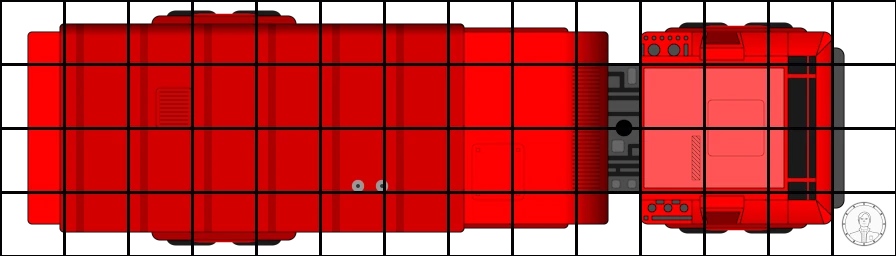
Note that even something like a Challenger 2 is only a bit over 4m wide (with full extended armour). The Brutus, if it’s meant to be this big, means it’s not viable for on-road use. For the token I’ve done for it, I’ve actually cut the length down to 21m.
So the token as I’ve designed it is not suitable for on-road use, and if placed on a map with sensibly sized roads, it won’t fit. But I don’t know whether this is what is intended.
The other vehicle I’m struggling with is the Destroyer. Partly because this is huge, and probably doesn’t make for a sensible token if done at scale. At 4,000 spaces (or 2,000 shipping tons), it’s pretty big. But the destroyer probably has multiple decks, which cuts down the needed height and width a lot.
A British Tribal Class Destroyer from WW II was 115m in length, and 12m in width and seemed to have about 4 main decks. That means 500t per deck, and 4 spaces (1.5m) in width. That makes it 125 spaces long – about 180m. So it’s possibly a bit too big.

The current token design I have is shorter than that, assuming more decks. Possibly I should make it longer, though I don’t know how useful such a token would be. I do like having properly sized tokens though, because I get fidgety if they’re not right, and it makes it much easier for me to visualise things (I seem to have some degree of aphantasia, so often get confused with ‘theatre of the mind’).
Then there’s things such as the Titan Turtle, which is 20 million spaces. That’s way too big for a single token. It’s bigger than the largest spacecraft. So I’ll probably skip that one.
But I will try to get tokens done of all the official vehicles, once I figure out how to convert spaces and tons to physical dimensions. It would have been nice if Mongoose had provided some scaled images with the vehicles though.